CAMLIN CONTACT

Your approved service, running live across every channel.

Queues, routing, voice, visual IVR, avatar sync and SMS handoff in one stack.Agents build the service in Architect. Contact runs it live, every call and every handoff from one runtime.
Asterisk + Nuamedia runtime
Multiple speech engines, open TTS
Avatar lip-synced to live calls
Fargate, on-prem, or air-gapped
See the voice runtime

Camlin Contact

Live contact center operations

Voice Runtime
IVR, queues, routing, SIP trunks, and live telephony control
Contact Operations
Supervisors, agent workflows, real-time monitoring, and handoffs
Platform Services
Speech, Avatar, VoiceID, and Insight around the core
Connected Platform
Camlin Architect
Agents build the service; Contact runs it
Camlin Speech
Multiple speech engines, recognition + TTS
Camlin Avatar
Lip-synced avatar on the live call
Contact voice runtime
IVR, telephony, and call lifecycle

Built for real contact centres

Run it as the main stack or fit it into the stack you already have.

Any infra
Deployment
AWS, private cloud, on-prem, or air-gapped
Open SIP
Telephony
Asterisk + Nuamedia telephony runtime
5+
Channels
Avatar, visual IVR, SMS, and chat in one session
Multiple
Speech engines
Camlin Speech or cloud engines — choose per journey
What happens when a call arrives at a contact centre running on Camlin Contact?
THE OPERATING STACK

Everything a call needs, in one stack

Telephony, speech, avatar continuity and identity in one contact-centre stack.
  1. Step 1

    The call arrives

    On open SIP trunks from your carrier, into Camlin Contact.

  2. Step 2

    The runtime runs the journey

    IVR, prompts, retries and transfers from the approved Blueprint. Camlin Speech listens and speaks in every turn.

  3. Step 3

    Screen and identity when needed

    An SMS link opens the live avatar in the browser. VoiceID verifies the caller inside the same call.

  4. Step 4

    Queue, agents, evidence

    Supervisors and agents work in the Contact console. Insight records what happened.

One live call, on the phone and on the visual IVR at onceA mobile on an ordinary call: Camlin Contact on the line, the timer, the dial pad and a red hang-up. An SMS banner lands on that screen. The line runs from the banner to the same caller’s phone as visual IVR: her face lip-synced to the live voice with Change my booking, Check a balance and Something else as pill buttons under her, and the hang-up. He stands beside it, still talking.THE SAME LIVE CALLCamlin Contact00:42SMS linktap to continue on screen123456789*0#Voice callthe SMS lands hereChange my bookingCheck a balanceSomething elseVisual IVR on his phone

Visual IVR lives on the caller’s phone, not on a computer.

One contact-centre runtime

Queues, routing, supervisors, handoffs and live operations in one stack you can deploy.

Queue, routing, and supervisor control
Cloud, on-premise, or air-gapped
One stack for voice and digital channels

Contact voice runtime

Open telephony with the Nuamedia runtime on top. IVR, prompts, retries, transfers, queue entry and live call control in one system.

Open SIP trunks, any carrier
Live call and queue control
Camlin Speech by default; cloud engines when a tender requires them

Avatar, visual IVR, and SMS continuity

The same runtime handles voice, avatar lip-sync, on-screen forms and SMS handoff.

Avatar synchronised to the live call
Visual choices on the phone screen
SMS handoff when the call ends

Identity where it matters

Add Camlin VoiceID verification to the journeys that need it, chosen per Interaction and audited per session.

Consent-first voice enrolment
Outcomes returned to the flow, not scores
Evidence recorded in Insight
OUTBOUND + VISUAL IVR

Outbound campaigns and identity-confirmed journeys

Outbound calls, SMS visual journeys and identity confirmation, designed in the same Blueprint as inbound.
Platform-initiated calls

Outbound that the platform runs end-to-end

Trigger calls from the same Blueprint that handles inbound. Avatar, speech, prompts and routing are already defined.

Trigger from event, schedule, or campaign
Same Blueprint, same speech, same avatar
Audit trail and runtime trace per call
Visual IVR over SMS

A visual journey that meets the call

Pair the call with an SMS visual journey on the customer's phone: forms, choices, document capture, signature.

On-screen forms, choices, and capture
Sync with the live call or stand alone
Document capture and e-signature ready
Identity confirmation

Gates for regulated journeys

Knowledge questions, Camlin VoiceID, SMS verification or document checks, chosen per Interaction and audited per session.

Knowledge, voice biometric, or SMS verification
Document and ID capture via Visual IVR
Per-session audit and consent capture
See voice runtime detail
LIVE OPERATIONAL VIEW

Call, avatar, and runtime — one live view
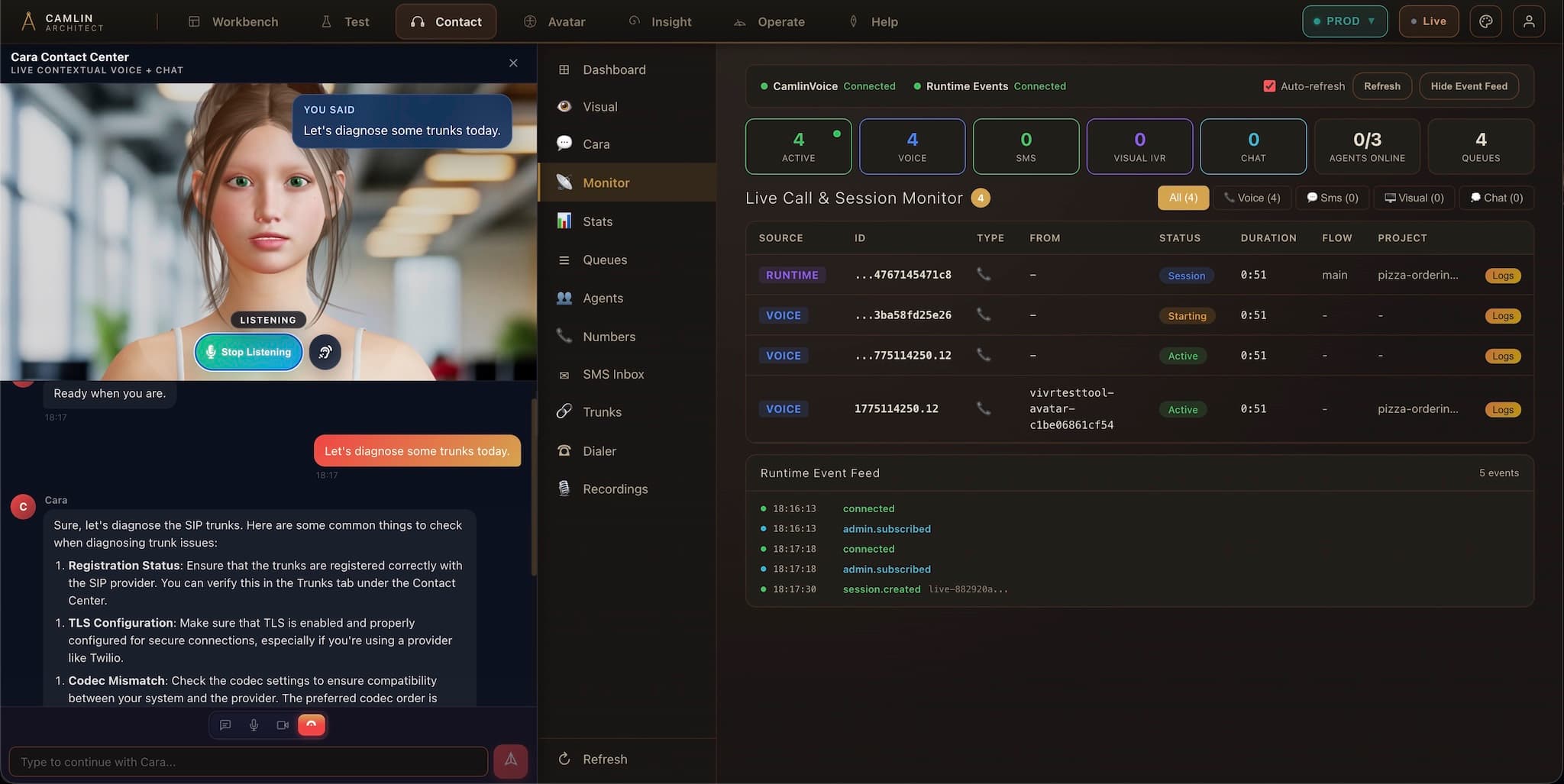
Call state, avatar presence, visual IVR and runtime diagnostics in one view.
Deep proof
Click a step to zoom in
Camlin Contact showing a live avatar help panel, call dashboard, and runtime monitoring.

One platform

Camlin Connect runs the whole service

One approved service definition, live on voice, chat, SMS, avatar and web. Runs as shared SaaS, dedicated cloud, or on your own infrastructure, air-gapped included.

Deployment and architecture →
Architect

builds and approves the service

Camlin Connect

runs the approved service on voice, chat, SMS, avatar and web

Insight

records what happened

  • Contact

    runs the call and the queue

  • Speech

    listens and speaks, hosted in Sydney

  • Avatar

    puts a face on the call

  • VoiceID

    verifies the caller in the call

  • Companion

    the avatar on your own website

SEE IT LIVE

See Contact run a live service

Watch a call go through queues, avatar and VoiceID on one runtime. Then decide where it fits.
See the voice runtime on a call