Describe → agents build → join meetings → talk to it → go live

Camlin Architect. Agents build the app. You review, steer, and publish.

Describe what you need. AI agents build the whole application — conversation flows, escalations, edge cases. Click any step to talk to it. Join live meetings with AI avatars. Approve it and go live across every channel with one click.Like Cursor for customer service — but you can also join AI meetings and talk to any part of the running app.
Describe → agents build itTalk to any step directlyJoin live avatar meetings
How Architect works
Four steps — from describing what you need to going live on every channel.
Blueprint
Tap any step
Choose a step
Step 01

Describe what you need — AI agents build the whole application.

Type or speak the service you want. AI agents create a full Blueprint with conversation flows, escalation rules, goals, and edge cases. You get a working draft in minutes, not weeks.

What you get

A complete first draft — conversation flows, escalation rules, goals, and edge cases — from a single description.

Why this is different

You skip weeks of requirements docs and get straight to reviewing a working application.

Architect on screen
Click a step to zoom in
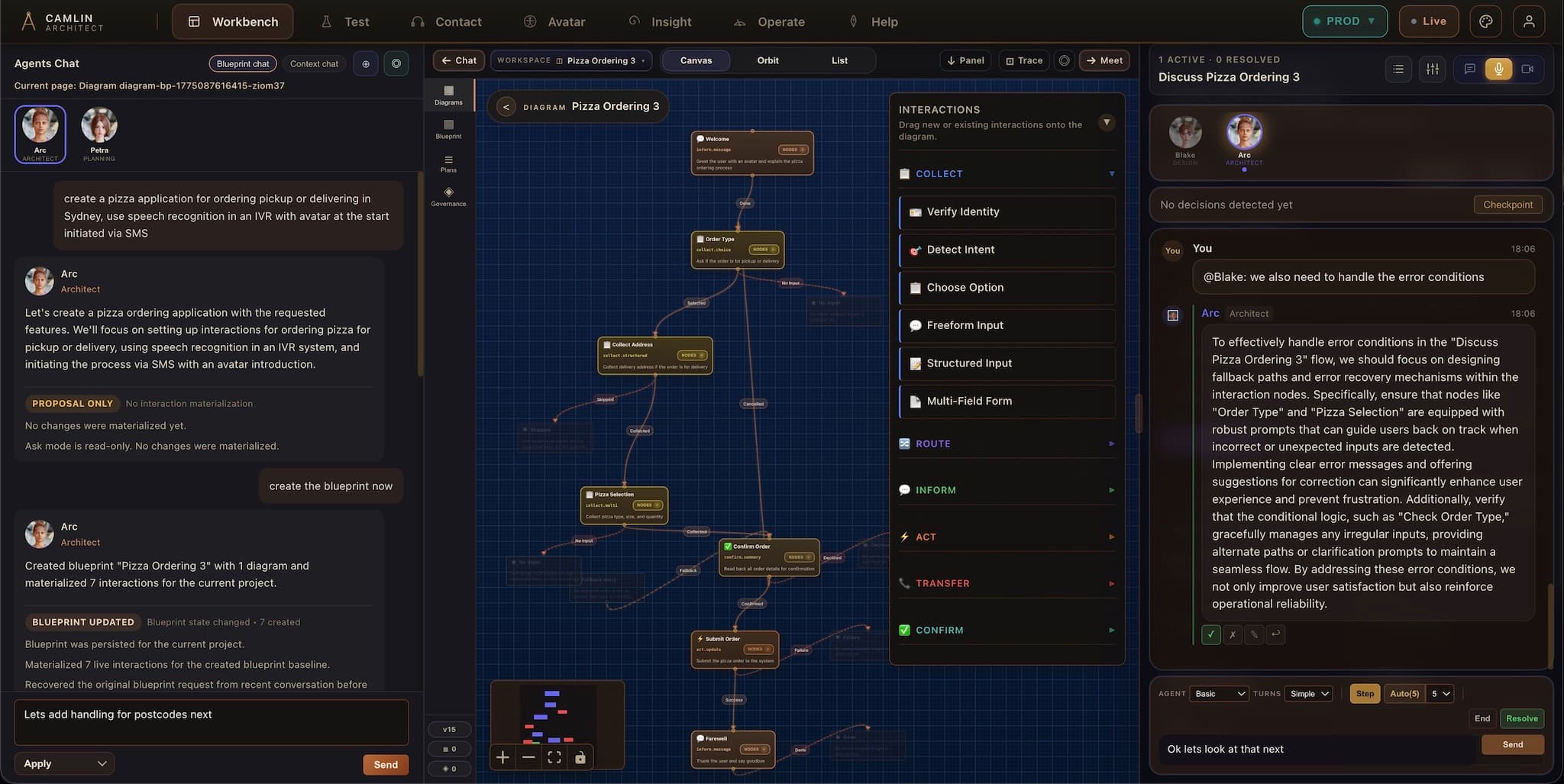
Camlin Architect workspace showing agent chat, a Blueprint diagram, interactions, and a live review panel.
THE WORKFLOW

Idea to approved app in one place

Describe the service you want. Agents draft the Blueprint. You review, meet, talk to any part, accept, and publish. Everything stays in one workspace.

Describe it, agents build it

Tell the system what you need in plain language. Specialist agents draft the Blueprint, diagram, Interactions, speech prompts, and channel logic.

Plain language in, working service out
Multi-sweep generation with compliance checks

Meet, review, decide

Watch avatar specialists discuss the service. Interject with direction. Decisions become plans saved inside the Blueprint — not in meeting notes.

Live agent meetings with avatar walkthroughs
Plans applied directly to the service

Talk to any part of it

Every Interaction is an agent. Open a conversation with any part of the running service — ask questions, give direction, see changes before they apply.

Like talking to your codebase
Every change tracked in Blueprint history
THREE MODES

Ask, Apply, and Collaborate

Explore without changing anything, let agents draft changes for review, or step into a live meeting with specialists and avatars. Switch between modes without leaving the workspace.

Ask

Explore the Blueprint, question Interactions, understand impact — without changing anything.

Explore without side effects
Question any part of the service
Understand impact before editing

Apply

Give direction in plain language. Agents draft the changes. You review before anything lands.

Agents draft changes you inspect
Consistency and control checks
Approval before changes land

Collaborate

COLLABORATIVE

Specialist agents and your team in the same meeting. Watch avatars discuss the service. Interject. Decide. Apply.

Live agent meetings with avatars
Pause, steer, and inspect
Decisions saved as plans
THE CURSOR MODEL FOR SERVICE APPS

Build service apps the way Cursor builds code

Cursor changed how developers write code: describe what you want, agents generate it, review the diff, accept. Camlin Architect brings that exact model to customer service. Describe the service in plain language. Specialist agents draft the entire application. Walk through the result, converse with any part, accept what works.
Describe

Describe the service you want

Tell the system what you need in plain language. "Build a booking service that handles phone calls, sends SMS confirmations, and lets customers check status online." That is enough to start.

Draft

Specialist agents build it

Camlin's specialist agents draft the Blueprint, diagram the service flow, create the Interactions, set up the speech prompts, and wire the channel logic. They work the way a development team would, but faster.

Review

Review what the agents built

The full service appears in the Architect workspace. Walk through the Blueprint, open the diagram, inspect each Interaction, test the speech prompts, and see how it will look in every channel.

Accept

Accept and publish

Accept the changes, run a final review, and publish the approved service. It goes live across voice, chat, SMS, avatar, and web from a single approved definition.

Every step stays inside the Architect workspace. The agents work with the same Blueprint, diagram, and Interaction model that you review and approve. Nothing is generated outside the system.

AGENT MEETINGS

Watch AI specialists discuss your service. Interject. Steer. Get decisions.

This is not a chatbot. Set goals for the meeting, then watch specialist avatars discuss your service in real time — reviewing the Blueprint, walking through Interactions, highlighting risks. Interject with direction, challenge proposals, set new goals mid-session. The meeting produces decisions and plans that agents apply directly to the application, stored permanently in the Blueprint history.
Set goals

Tell the meeting what to achieve

"Review the payment flow and decide on the escalation path." "Find every place the customer could get stuck." "Plan the next release." You set the agenda — the meeting has a purpose before anyone joins.

Watch

Avatar specialists discuss your service

Specialist avatars join the meeting alongside your team. Watch them walk through the Blueprint on screen — one specialist reviews the speech flows, another challenges the escalation logic, another proposes a simpler channel path. This is a working review, not a slide deck.

Interject

Step in and steer the conversation

You are not a spectator. Interrupt when you disagree, redirect the focus to the part that matters, challenge a proposal, or ask an agent to explain its reasoning. The meeting responds to your direction in real time.

Decide

Decisions become plans inside the service

Accepted outcomes are saved as plans inside the Blueprint — not in meeting notes, not in a spreadsheet. Plans that stay attached to the exact Interactions they affect, ready to be applied.

Apply

Agents carry out the accepted changes

Plans from the meeting are applied directly to the live service. Agents update the Blueprint, Interactions, and channel logic while you review. Every decision, every change, every version stays in the Blueprint history — searchable forever.

TALK TO YOUR SERVICE

Talk to any part of your running service

Every Interaction in your service is a living agent. Open a conversation with any part of the running application — ask it questions, give it direction, understand how it works, tell it to change. This is like being able to talk to your codebase, but for customer service apps.
Payment Interaction

"What happens if the card is declined?"

The Interaction explains its retry logic, timeout path, and how it hands off to a human agent after the second failure.

Booking Interaction

"Show me every place a customer could get stuck"

The agent walks through its branches, highlighting dead ends, missing prompts, and unclear paths — then offers to fix them.

Escalation Interaction

"Why did the last three callers reach a dead end here?"

The agent cross-references Insight data to show the exact branch condition that caught callers, and proposes a clearer prompt.

SMS Follow-up Interaction

"Add a confirmation message after the booking completes"

The agent drafts the SMS template, connects it to the booking outcome, and shows you the change before applying it.

GIT BLAME FOR CUSTOMER SERVICE

Every conversation, every decision, every version. Searchable.

Every conversation you had with an agent. Every decision from every meeting. Every version of every Interaction. Searchable, comparable, and restorable — like git blame, but for your entire service lifecycle instead of just code.

Full change history

Every edit, every agent draft, every accepted change is recorded. You can see what the service looked like at any point in time and understand how it evolved.

Meeting decisions stored

Plans and decisions from agent meetings are saved inside the Blueprint. Not in meeting notes, not in a separate tool. They stay attached to the service they belong to.

Version comparison

Compare any two points in the service history side by side. See what changed in the Blueprint, the diagram, and individual Interactions between releases.

Audit-ready trail

For regulated environments, the Blueprint history provides the evidence trail that compliance teams expect: who changed what, when, why, and what was approved.

Rewind and restore

Roll back to any previous state of the service. If a change causes issues, restore the last known-good version and the Blueprint, Interactions, and channel logic all return together.

Continuous, not snapshot-based

The history builds continuously as the team works. There is no separate "save" or "commit" step. The Blueprint records changes as they happen, so nothing is lost between checkpoints.

SEE IT WORK

Short proof moments

Short clips: building from what you describe, live avatar meetings, a conversation with any step, and one-click publish to every channel.
Describe it — agents build it
5-7s

Describe it — agents build it

Type or speak what you need. AI agents build the complete application — conversation flows, escalation rules, goals — in minutes, not weeks.

Join a live meeting with AI avatars
6-8s

Join a live meeting with AI avatars

Watch AI avatars discuss your service in a real meeting. Hear them talk, interject with your voice or text, and get a plan generated at the end.

Talk to any part of the service
5-7s

Talk to any part of the service

Click any step and have a conversation with it. Ask why it escalates, change the wording, test an edge case. It answers back and updates the logic.

Go live everywhere at once
5-7s

Go live everywhere at once

Your approved service goes live on voice, avatar, chat, SMS, and web with one click. No rebuilding, no separate versions.

GET STARTED

See Architect for yourself

Tell us about your team and service model. We will scope a demo, pilot, or access path.

By submitting, you agree to be contacted about Camlin Architect.

SEE IT FOR YOURSELF

Everything on this page works. See it.

Watch AI agents build a service. Step into their meeting. Talk to any part of the result. This is live today.