Connect
Blueprint → Interactions → live trace → avatar meeting → publish
Camlin Architect. Agents build the app. You review, steer and publish.
Describe the service you want. Architect turns it into a Blueprint, Interactions, speech prompts, runtime logic and channel flows. Review it with live avatars, inspect the trace, publish the approved service.Generation, review, trace, live mode and rollout in one workflow. No slide deck required.
Describe → agents build itTalk to any step directlyJoin live avatar meetings
How Architect works
Four steps — from describing what you need to going live on every channel.
Blueprint
Tap any step
Choose a step
Step 01
Describe what you need. Agents build the whole application.
Type or speak the service you want. Agents draft the full Blueprint: flows, escalation rules, goals.
What you get
A complete, working first draft from a single description.
Architect on screen
Click a step to zoom in
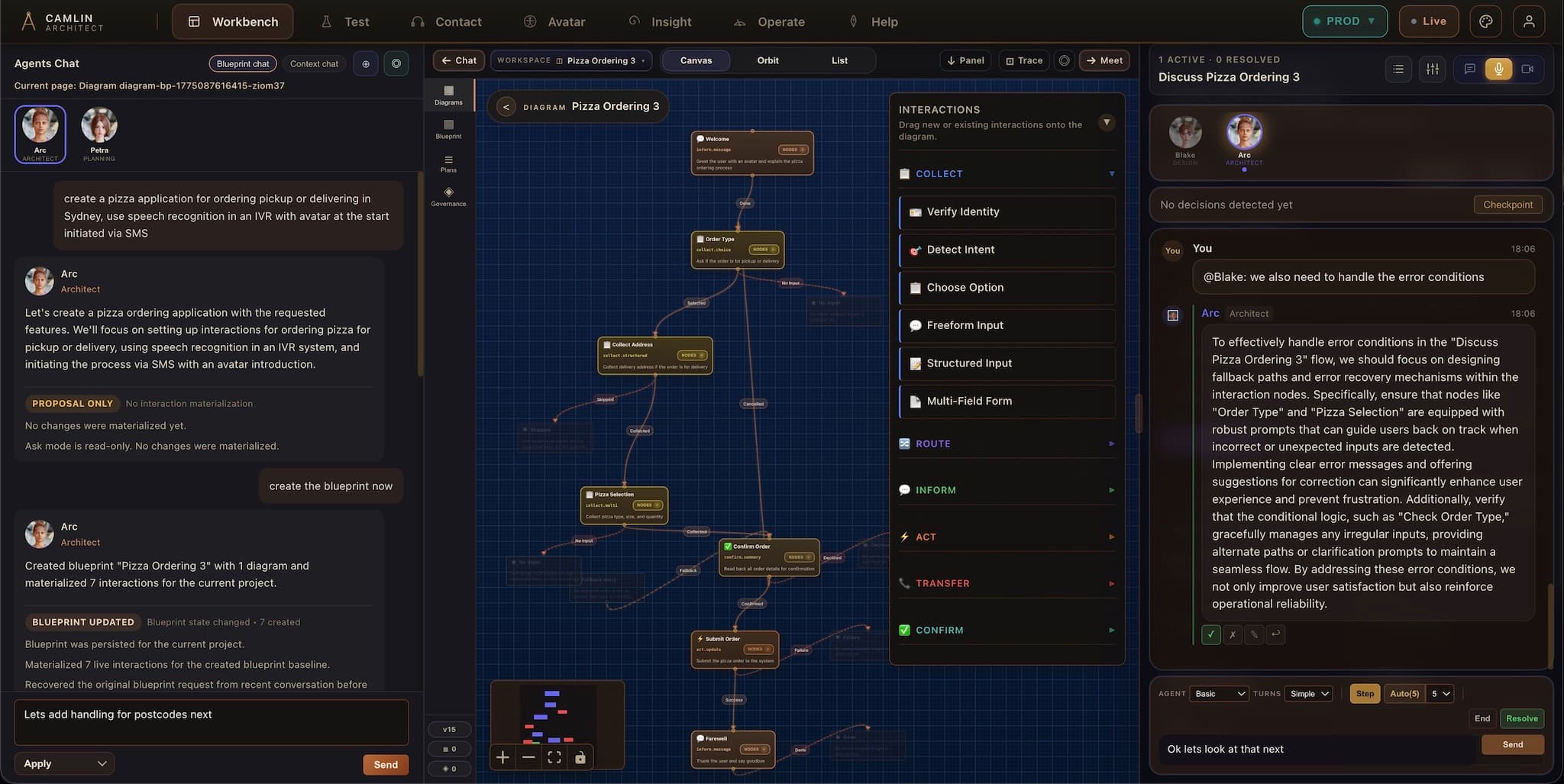
An agent-driven interface
Converse. Agents build. Review. Loop.
You describe, the agents build, you review, and it loops until the service is right. Nothing lands without your approval.
Converse
Ask anything about the service, or give direction in plain language. Questions are always safe. Nothing changes until you say so.
- Explore without side effects
- Question any part of the service
Agents build
Specialist agents draft the Blueprint, Interactions and channel logic, solo or in a live meeting your team can steer.
- Drafts you inspect before they land
- Live meetings with avatar specialists
Review, then loop
Inspect the diff, approve or redirect, go around again. Each pass sharpens the service. History keeps every step reversible.
- Approval before changes land
- Every change tracked in history
And AI is optional. Build fully scripted flows with no AI in the runtime at all, or mix governed scripted steps with AI-led conversation in the same Blueprint. Deterministic flows are first-class, not a fallback.
From a brief to a live service
Design, test, deploy
Three stages, one approval gate, and a loop back whenever it is not right yet. The same release then runs on every channel.
1 · Design
Describe it. The agents draft it.
Say what the service should do in plain language. Specialist agents draft the Blueprint, the Interactions, the speech prompts and the channel logic, on their own or in a meeting your team can steer. Each step can be scripted, AI-led or both.
- Plain-language brief
- Agent meetings
- Scripted or AI-led
2 · Test
Run it on every channel before anyone calls.
The cross-channel simulator runs the same flow as a voice IVR, web chat, SMS, avatar and visual IVR side by side. Talk to it, follow the live trace node by node, and send the agents back with notes.
- Voice IVR
- Web chat
- SMS
- Avatar
- Visual IVR
3 · Deploy
Publish one approved release.
Compare versions side by side, approve, and one release goes live on voice, chat, SMS, avatar and web. Nothing is rebuilt per channel, and rollback returns the service to the previous release.
- Voice
- Chat
- SMS
- Avatar
- Web
Not right yet? Inspect the diff, redirect the agents and go round again. Nothing lands without your approval.
Camlin Insight keeps every change, plan, release and live event.
Publish to shared SaaS on camlinconnect.com.au, a dedicated cloud, or your own infrastructure, air-gapped included. Deployment options →
What is in Architect
Everything you need to design, test and publish
The builder and its consoles, as they ship today.
Blueprint and Interactions
The plan for the service and the conversations inside it, drafted by agents from a plain-language brief and edited by you.
Agent meetings
Specialist avatar agents talk a change through with your team, live. The plan from the meeting is saved to the Blueprint.
Cross-channel simulator
The same flow as a voice IVR, web chat, SMS, avatar and visual IVR, side by side, before a single customer sees it.
Live trace
Follow a running session through the flow node by node, and see exactly which step a caller is on.
Versions, review and rollback
Every change is tracked. Compare versions side by side, approve before anything lands, and restore any previous state.
Data and your systems
Flow steps read and write governed data in Camlin Server, call your APIs, and let your own agents edit flows under the same review controls.
Git blame for customer service
Every conversation, every decision, every version. Searchable.
Every conversation, decision and version of your service: searchable, comparable and restorable.
Full change history
Every edit, agent draft, and accepted change is recorded — see the service at any point in time.
Meeting decisions stored
Plans from agent meetings live inside the Blueprint, attached to the service they belong to.
Audit-ready trail
Who changed what, when, why, and what was approved — the evidence trail compliance teams expect.
Rewind and restore
Roll back to any previous state — Blueprint, Interactions, and channel logic return together.
Recent releases
What's new in Architect
Dated Architect releases from the changelog. All of it visible in a walkthrough.
Camlin Create is in full release: describe a phone or chat assistant to a Camlin avatar and it is built for real in Camlin Connect from the conversation; publishing waits for a person to approve it. First month free, with no card required.
Start your free month →The Camlin Connect family
How the pieces fit together
Architect designs it, Speech hears it, Avatar shows it, Contact runs it, VoiceID verifies the caller and Insight proves it. Companion, Create and Team bring the same avatars to your website, your ideas and your meetings.
- Camlin AvatarA live avatar on the call, on your website and in meetings.
- Camlin ContactVoice, SIP trunks, queues, visual IVR and SMS, run live.
- Camlin SpeechRecognition and Camlin Voice text-to-speech, hosted in Sydney.
- Camlin InsightTraces, diagnostics, change history and audit evidence.
- Camlin VoiceIDConsent-first voice enrolment and verification in the call.
- Camlin CompanionAn avatar for your website that can answer your phone.
- Camlin CreateNewThe maker you talk to. First month free. (opens in a new tab)
- Camlin TeamNewMeetings with specialist avatar seats. (opens in a new tab)
Get started
See Architect for yourself
Request access to Camlin Architect. We review each request; once approved you sign in at architect.camlinconnect.com.au and start building. Prefer a guided tour first? Book a walkthrough.